
Google Business Profile · Local SEO · Tradies
The Power of Google Reviews for New Zealand Tradies
Executive Summary
Key takeaways, what you'll get from this guide
- Why Google reviews are now the single biggest factor in whether you appear in the Google Maps 3-pack
- The exact wording to use when asking customers for a review, including a copy-and-send SMS template, the one customer you should never ask, and what you're legally not allowed to do
- How to respond to negative reviews without making things worse
- What Google changed in 2025–2026 that affects how tradies collect and manage reviews
- A 4-step action plan to start getting reviews consistently from your next job
In today's digital world, New Zealand tradies face fierce competition for local work. Whether you're a plumber in Manukau, an electrician in Hamilton, or a builder in Christchurch, there's a powerful marketing tool many tradies overlook: Google reviews. Google reviews are no longer just a nice-to-have, they're a major factor in how easily customers can find you and whether they decide to hire you.
This guide explores why Google reviews are essential for New Zealand tradies and provides simple, actionable strategies to use them effectively, including the latest changes Google made in 2025 and 2026 that every tradie needs to know about.
What are Google reviews? Google reviews are public testimonials left by your customers directly on your Google Business Profile. They appear right next to your business name in Google Search and Google Maps, acting as instant social proof. Because they are prominently displayed to locals searching for your services, they are one of the most critical factors in determining whether your phone rings or your competitor's does.
Why Google Reviews Matter: The Numbers
The statistics tell a compelling story about how much online reviews matter:
93% of consumers say online reviews impact their purchase decisions, making them a huge part of how people choose who to hire 1.
Tradies with strong reviews see higher revenue, research shows each star increase in your Google rating correlates with a 5–9% increase in revenue 2.
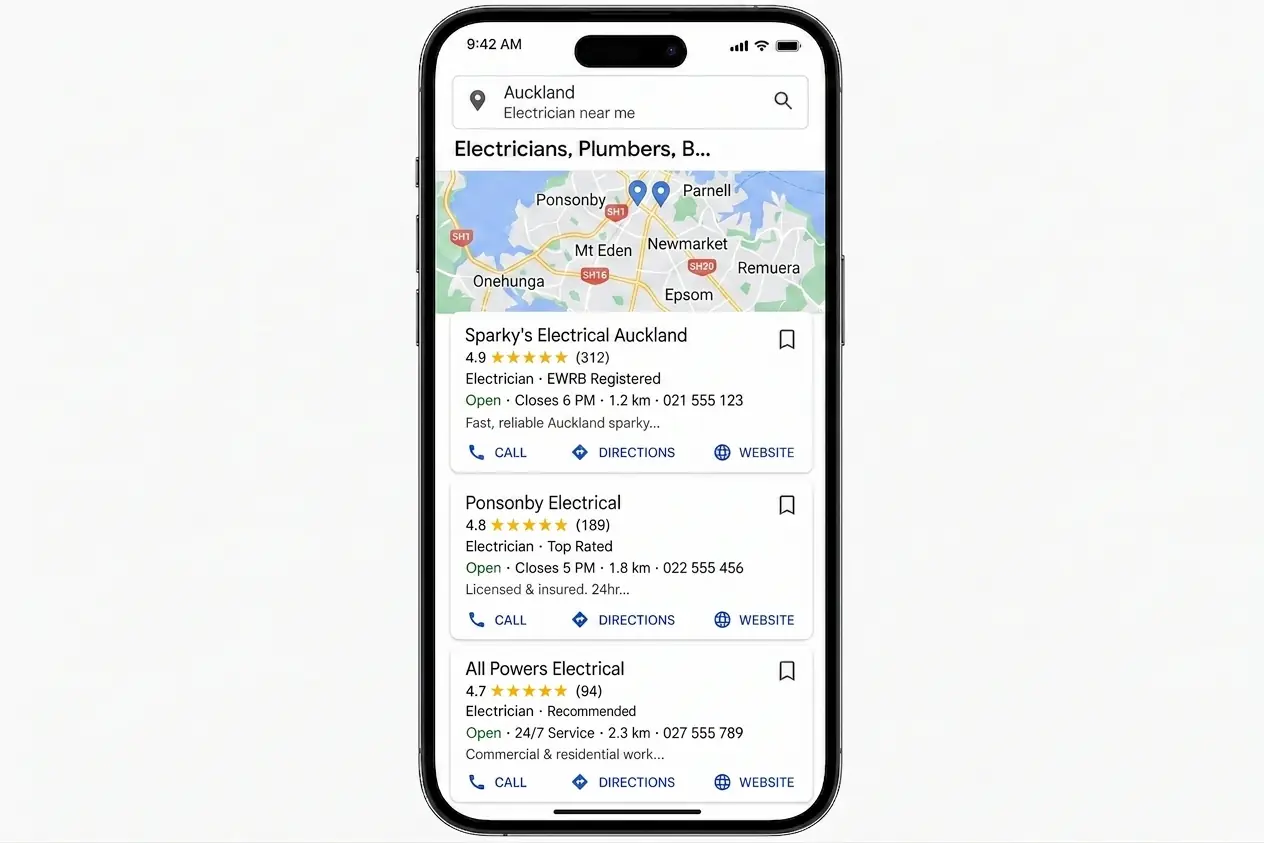
42% of people searching a local term click a result in the map pack, the box of three businesses above the normal listings, and reviews are one of the biggest factors in who fills those three spots 3. For the full map-pack habit plan (reviews plus photos, replies, and listing depth), see how to get into Google Maps top 3 for tradies.
Reviews are one part of a bigger local ranking picture. To see how they work alongside your Google Business Profile, on-page SEO, and suburb pages, read our complete local SEO guide for tradies.
97% of consumers read reviews for local businesses, going by BrightLocal's 2026 survey of US consumers 4.
Each position you climb in local search brings an average 15–20% increase in enquiries 5.
For New Zealand tradies, these numbers mean real jobs and real income. When someone searches "plumber near me" in Ponsonby or "electrician Hamilton," Google uses your review profile to decide if you should show up at the top.
How Google Reviews Impact Your Local Search Rankings
Google's search algorithm heavily relies on reviews when deciding which tradies to display prominently. Here's exactly what Google looks at:
Review Quantity
More reviews tell Google that your business is established, active, and trusted by real locals. Google's system favours businesses with a higher number of reviews. For tradies in competitive markets like Auckland, Hamilton, or Wellington, the amount of reviews you have can be the difference between appearing in the top 3 Map results or being buried on page 2.
Review Quality
Your overall star rating directly affects your ranking. Google prioritises businesses with higher ratings, especially those above 4.0 stars. If you want to stay competitive and keep the phone ringing, aiming for an average rating above 4.3 stars is the sweet spot.
Review Recency
Fresh reviews matter more than old ones. Google knows businesses change over time, so they give preference to tradies who are consistently getting new reviews. Getting 20 reviews three years ago is actually less effective than getting 5 reviews in the last month. Keeping a steady trickle of reviews coming in is essential. In fact, Google's algorithm processes reviews using a strict Review Recency Decay Model, where reviews older than 30 days lose up to 80% of their ranking weight. You can read the full algorithmic details in our Google Business Profile Ranking Factors 2026 Metasearch Report.
Review Responses
Google has confirmed that responding to your reviews helps your local SEO. When you reply thoughtfully to both positive and negative feedback, it shows Google, and potential customers, that you care about your service.
The Customer Journey: How Reviews Influence Tradie Selection
Understanding how New Zealand homeowners look for tradies shows exactly why reviews are so powerful:
Discovery Phase
When someone has a leaking tap, a switchboard problem, or needs a deck built, their first move is usually to pull out their phone and search Google. Terms like "licensed plumber Auckland" instantly bring up local options with their star ratings front and centre. At this moment, tradies with strong ratings stand out immediately, while those with poor ratings, or no reviews at all, are often skipped over.
Evaluation Phase
Once a potential customer taps on your Google Business Profile, they'll check out:
- Your overall star rating
- How many reviews you have
- How recent the reviews are
- Specific comments about your workmanship, reliability, and pricing
- How you reply to feedback (especially complaints)
- Photos shared by previous customers
People typically spend just 2–3 minutes reading reviews before making a decision. During this brief window, your profile either builds trust or raises red flags.
Decision Phase
The final decision to call you relies heavily on what others have said. Research found that 49% of consumers need to see at least a 4-star rating before hiring a local service 6. For tradies, trust is everything, you're often letting someone into their home, and a strong review profile does the selling for you before you even answer the phone.
2026 Update: What's Changed with Google Reviews
Google made significant changes to how reviews and profiles work across 2025 and 2026. If you haven't checked your approach lately, you might be falling behind.
Google Is Removing Fake Reviews with AI
Google is now using advanced AI to detect and remove fake reviews on a massive scale. If you've ever thought about using a "reviews service" or asking mates to leave reviews without them actually using your services, don't. These are being caught quickly, and repeat offences can get your entire Google Business Profile suspended.
Video Verification for New Profiles
As part of their 2026 updates, Google has made video verification the standard for new tradie profiles. This makes it harder for fake businesses to appear on Maps, which is great news for legitimate tradies with real reviews.
Stricter Rules on Asking for Reviews
Some tactics that were common a few years ago are now strictly against the rules:
- Mentioning staff by name, asking customers to specifically name a staff member in their review is no longer allowed.
- On-site pressure, handing a customer an iPad or directing them to leave a review while they are still on your property is not permitted (casually asking is fine, but forcing the device on them isn't).
- Offering incentives, giving discounts, waiving call-out fees, or offering gift cards in exchange for reviews will result in the reviews being removed.
The safest approach is simply saying: "We'd love your feedback online if you have a spare moment."
Local Services Ads Reviews Consolidated
Reviews from Google's Local Services Ads (LSA) have been merged into the main Google Business Profile in the markets where LSA operates. LSA is not currently available in New Zealand, so this change won't affect your review count here, but it's worth knowing about if you ever work across the ditch.
Common Mistakes Tradies Make with Google Reviews
Many tradies mismanage their reviews in ways that quietly cost them leads:
1. Not Actively Asking for Reviews
The biggest mistake is just waiting for reviews to happen. Since unhappy customers are naturally more motivated to complain, sitting back often leads to a negative-looking profile. A tradie who does 5 great jobs a week but never asks for a review will easily lose out to a competitor who does 3 jobs and asks every time.
2. Ignoring Negative Feedback
Leaving a bad review unanswered is a huge red flag for future customers. It makes it look like you don't care, or that you agree with the complaint. Every negative review is actually a chance to show dozens of future customers how professional you are.
3. Copy-Paste Replies
While responding is important, using the exact same generic template for every review looks lazy. Customers can spot a copy-paste reply instantly. Just changing a few details to make it personal goes a long way.
Best Practices for Building and Managing Google Reviews
Building a strong profile requires a simple but consistent routine:
Creating a Routine to Get Reviews
You need a simple system to gather reviews. For tradies, the best time to ask is right after the job is finished, when the customer is happy and can see the results. Try these approaches:
Name the job, not just the suburb. When you ask, get specific. "Fixed our blocked drain in Riccarton, quick and tidy" beats "Great bloke, five stars," and it even beats "Great job in Riccarton." That exact kind of line is what Google prints as a quote under your listing when someone searches that job in that suburb. See why Google quotes your reviews in the map pack for the live New Zealand test data behind it.
- Before you leave, simply say: "If you're happy with the work today, a quick Google review would really help us out."
- Follow-up SMS, shoot them a quick text 1–2 hours after leaving with a direct link to your review page. The exact wording is below.
- Business cards, a QR code linking directly to your review page, with the line: "Happy with the work? Let us know on Google."
- Job management software, tools like ServiceM8 can often send an automated review request once you mark a job as complete.
The secret is consistency. Ask on every job, not just the massive ones. For a full after-job system (templates, triggers, what not to automate), see Google reviews on autopilot.
What to Text a Customer to Ask for a Review
The text is where most reviews actually come from, and most tradies never send one because they are not sure what to write. Here is the wording. Send it 1 to 2 hours after you drive off, while the job is still fresh and the customer is not standing next to you feeling put on the spot.
One rule before you send anything: if you know the customer is unhappy, don't ask them for a review. If the job didn't go to plan, a snag is still open, or they were short with you on the way out, the review request stays in your pocket. Asking then is asking them to put it in writing where every future customer will read it, and you have talked yourself into a one-star. Ring them, sort the problem, and if they end up happy with how you handled it, ask then. Plenty of the best reviews tradies get are from jobs that went sideways and were fixed properly.
The review request SMS
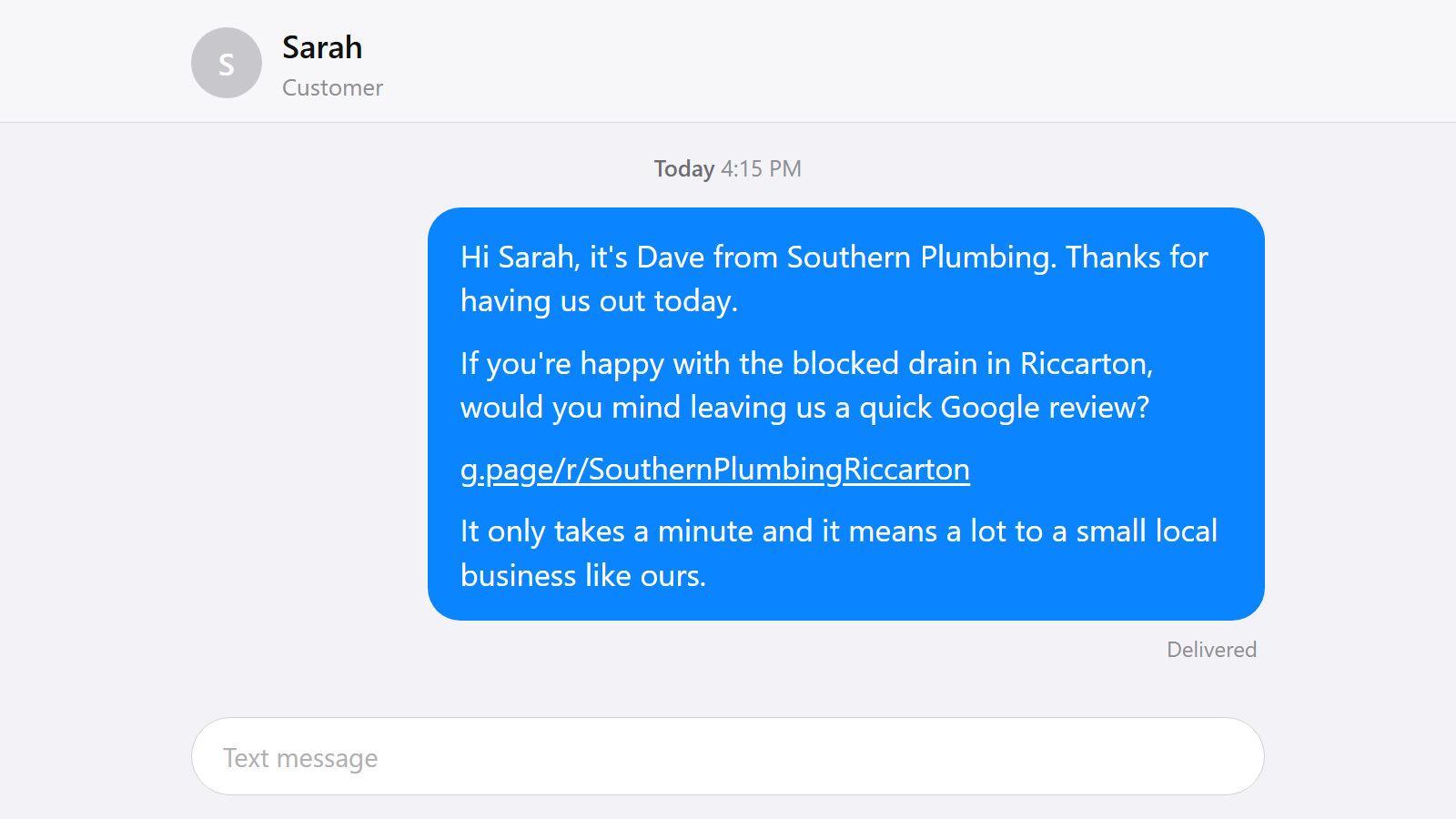
Hi [Name], it's [Your name] from [Business name]. Thanks for having us out today. If you're happy with the [job] in [suburb], would you mind leaving us a quick Google review? [your review link] It only takes a minute and it means a lot to a small local business like ours.
Filled in, that's: "Hi Sarah, it's Dave from Southern Plumbing. Thanks for having us out today. If you're happy with the blocked drain in Riccarton, would you mind leaving us a quick Google review? [your review link] It only takes a minute and it means a lot to a small local business like ours."
Every line in it is doing a job:
| The bit | Why it's in there |
|---|---|
| "it's Dave from Southern Plumbing" | They may not have saved your number. Say who you are before you ask for anything. |
| "the blocked drain in Riccarton" | Prompts them to name the job and the suburb in their own words, which is exactly the kind of line Google pulls out and quotes under your listing. |
| "would you mind leaving us a quick Google review?" | Says what you want and where. "Let us know how we went" gets you a text back, not a review. |
| "[your review link]" | One tap. If they have to search your business name and hunt for the review button, most won't bother. |
| "It only takes a minute and it means a lot to a small local business like ours" | Gives them a reason to bother. Most people are happy to help out a local they liked, but only if they know it actually matters and won't eat their evening. |
Where to get your review link. Sign in to business.google.com, open Home, then Get more reviews, and copy the direct link. It looks like g.page/r/... and it drops the customer straight onto the review box with the stars showing, no searching and no extra taps. Save it in your phone notes once and you never have to go looking for it again. Longer walkthrough in our Google Business Profile guide for tradies.
The short version, if your job software charges you per message:
Hi [Name], [Your name] from [Business name]. Happy with the [job] in [suburb]? A Google review would mean a lot: [your review link]
One SMS is 160 characters and a Google review link eats about 40 of them, so the longer version above goes out as two. That costs nothing from your own phone, but tools like ServiceM8 and Fergus usually bill per part. Leave emojis out for the same reason: a single emoji switches the message to a different encoding and drops the limit to 70 characters a part.
Then one nudge, and that's it:
Hi [Name], just chasing my last message. A quick Google review would mean a lot to us: [your review link] Thanks again.
Send that three or four days later, once. If nothing comes back, let it go and ask the next customer instead.
Leave these out of the text:
- Any incentive. No discount, no waived call-out fee, no gift card. Google strips those reviews and repeat offences put your whole profile at risk.
- "Could you give us 5 stars?" Ask for an honest review, not a rating. Same goes for asking them to mention one of your team by name, which Google now bans outright.
- A link to your website or Facebook. It has to be the direct Google review link, or you have added a step and lost most of them.
Save it as a shortcut. Add the message to your phone's keyboard shortcuts (iPhone: Settings, General, Keyboard, Text Replacement. Gboard on Android: Settings, Dictionary, Personal dictionary) so typing something like "revw" drops the whole thing in. From there it's ten seconds to swap in the name, suburb, and job.
How to Reply to Google Reviews
Responding to Positive Reviews
How you reply to reviews helps your SEO and your reputation. Use these as a starting point, but always add a personal touch:
The Appreciative Thanks
G'day [Customer Name], thanks so much for leaving a review! Really glad the [job type, e.g. hot water system install] went smoothly and that you're happy with the result. Always great to help out customers in [suburb]. Cheers, [Your Name], [Business Name]
How to Handle Negative Reviews
When you get a bad review, don't reply online straight away.
It is often best to call the customer first to talk through the issue and see if there is a way to resolve it. This personal approach can often lead to the customer removing the negative review themselves, or even updating it to a positive one.
If you still need to reply on Google after the phone call, tailor your response to mention the chat you had. For example:
The Professional Response (After calling)
Hi [Customer Name], thanks for taking my call today to talk through this. As we discussed, I'm genuinely sorry the [specific issue] didn't meet your expectations. We always take pride in our work, and I'm glad we could figure out a way to resolve this for you. Thanks for your honest feedback. Cheers, [Your Name]
Remember: potential customers will judge you not just on the reviews themselves, but on how professionally and calmly you handle criticism.
Why We Build Google Reviews into Every Website
At Made 4 Tradies, we always integrate live Google review feeds directly into the websites we build. Why? Because social proof is one of the strongest indicators for consumers when judging a business. It instantly builds trust and keeps your website looking fresh without you having to lift a finger.
Action Plan: Get Your Reviews Sorted
Here is a simple step-by-step plan to get your reviews working for you:
Step 1: Check Where You Stand
Before making changes, check your current status:
- How many reviews do you have?
- What's your average star rating?
- Are you replying to them?
Not sure how you stack up? Made 4 Tradies offers a free Google listing audit. We'll check your review profile, compare it to your competitors, and give you clear advice on how to improve. Get your free Google listing audit →
Step 2: Tidy Up Your Google Profile
Make sure your Google Business Profile looks professional:
- Check your hours, service areas, and phone number are correct.
- Add some recent photos of your van, your team, and your completed work.
- Make sure your licence or registration number is visible (this is a legal requirement for regulated trades).
Step 3: Get the Team on Board
If you have staff, they need to help:
- Remind the boys on the tools to casually mention reviews as they finish a job.
- Make sure they know they can't offer discounts for reviews.
- Encourage them to fix small issues on the spot, a quick fix today stops a 2-star review tomorrow.
Step 4: Make Asking a Habit
Decide exactly how you're going to ask (SMS, in person, or email) and stick to it. Set a small goal, even just getting 2–3 new reviews a month adds up fast.
Not Sure Where Your Google Profile Stands? Start Here.
If managing Google reviews feels like too much extra work, Made 4 Tradies can help. We specialise in helping New Zealand tradies in Auckland, Hamilton, and Wellington get more visibility on Google Maps, and your Google Business Profile is where it all starts.
Our free Google listing audit gives you:
- A clear PDF showing exactly what's costing you visibility in Maps
- A check of your review profile against local competitors
- Clear, simple recommendations on what to fix first
No Zoom call. No pitch. Just the audit, in your inbox within 24 hours.
Get your free Google listing audit →
Conclusion: Your Most Powerful Free Marketing Tool
For New Zealand tradies, Google reviews are one of the best marketing tools you have, and unlike paid ads, they stick around forever. They help you show up in local searches, build trust before the customer even calls, and make it easier to charge fair rates because your reputation speaks for itself.
By setting up a simple routine to ask for reviews, you can turn your Google profile into a reliable lead generator that keeps the phone ringing.
Frequently Asked Questions
How many Google reviews do I need to make an impact?
There's no magic number, but consumers usually start to really trust a business once it hits 40+ reviews. Even getting your first 10–20 reviews will put you way ahead of tradies who have none. Focus on consistent growth rather than a massive target.
How quickly will reviews affect my Google Maps ranking?
You might see a small bump in visibility within 2–4 weeks. However, real ranking changes usually take 2–3 months of consistent effort, especially in competitive areas like Auckland or Hamilton.
Is it legal to ask customers for reviews?
Yes! It's perfectly fine and encouraged by Google to ask customers for honest reviews. What you can't do is offer incentives (like a discount or a free call-out) in exchange for a review.
What should I text a customer to ask for a Google review?
Keep it short, say who you are, name the job and the suburb, and include your direct review link. Something like: "Hi Sarah, it's Dave from Southern Plumbing. Thanks for having us out today. If you're happy with the blocked drain in Riccarton, would you mind leaving us a quick Google review? [your review link] It only takes a minute and it means a lot to a small local business like ours." Send it 1 to 2 hours after you finish the job, follow up once a few days later if you hear nothing, and never offer a discount or anything else in exchange. If you already know the customer is unhappy, don't send it at all. Fix the problem first, then ask only if they are happy with how you sorted it.
Can I remove a negative Google review?
You can't delete a review just because you don't like it. You can only ask Google to remove it if it breaks their rules (like hate speech, fake reviews, or spam). Your best bet is to call the customer to resolve it, reply professionally, and focus on getting more positive reviews to bury the bad one.
What changed with Google reviews recently?
Google significantly tightened its rules across 2025 and 2026. They are using AI to remove fake reviews faster, strictly banning the practice of naming staff members in review requests, stopping businesses from pressuring customers on-site, and rolling out video verification for new tradie profiles to stop fake competitors.
References:
- [1] Podium, 2017 State of Online Reviews
- [2] Harvard Business School, Reviews, Reputation, and Revenue
- [3] Backlinko, How People Use Google Search, map pack click share
- [4] BrightLocal, Local Consumer Review Survey
- [5] Google Business Profile Help, Improve your local ranking on Google
- [6] BrightLocal, Local Consumer Review Survey 2017, US consumers
Published by Made 4 Tradies. Kiwi-owned, run by a Hawke's Bay local. Serving tradies nationwide, from Auckland to Dunedin.
Free Google Listing Audit
See exactly what's costing you visibility on Google.
A real human goes through your Google Business Profile against the checks in this guide. You get a PDF with specific issues, specific fixes, ranked by impact.
No call. No pitch. No obligation. Turnaround within 24 hours.
Get my free Google listing audit →Want your website checked too? Free website audit →